Designer of the assignment, the simulation scaffolds and the web visualization
Period
Winter 2026
Status
Course assignment · completed teaching package
Discipline
Control systems · undergraduate electrical engineering
Simulation system
MATLAB · Simulink · Canvas · LaTeX
Landing simulation
This view replays a trajectory computed with the Simulink model and then exported: the playback controls do not rerun the simulation. It shows trajectory, state and landing criteria together.
×2.5
Measurements, forces and criteria
Vertical landing. The recorded trajectory connects position, velocity, angle, forces and five landing criteria. Its final state satisfies all five displayed criteria.Systems and Simulation · MATLAB / Simulink
1Context and problem
For Systems and Simulation, I wanted one scenario to connect transfer functions, PID control, modelling assumptions and simulation.
Control exercises often fragment angular dynamics, position loops and validation. The rocket scenario requires those decisions to remain connected inside one engineering problem.
2Constraints
Keep linearised and nonlinear models distinct
Connect MATLAB/Simulink export to a browser view
Do not expose instructor solutions or student data
What was produced
A six-page progressive engineering assignment
Reduced and complete Simulink model scaffolds
A web visualization of the exported trajectory, with telemetry and landing criteria
3How it was built
I introduce the nonlinear planar dynamics and state the simplifications explicitly.
I guide the design of pitch, horizontal-position and vertical-position loops step by step.
I make the reduced and complete models comparable under smooth landing references.
I close the investigation with a web visualization that exposes telemetry and landing criteria.
4Technical approach
4.1Comparable model layers
A reduced model supports controller design, while a complete model tests the same references under richer dynamics.
Why it matters. Students can inspect what each modelling assumption changes instead of treating simulation as a black box.
MATLAB · Simulink
4.2A simulation-to-web pipeline
MATLAB resamples the Simulink outputs and exports one trajectory that the browser can replay.
Why it matters. The engineering model remains the source of truth while the result becomes portable and easy to review.
MATLAB · JavaScript
4.3Synchronized physical and signal views
The rocket motion, control variables, plots and landing criteria advance on the same timeline.
Why it matters. Learners can connect equations and signals to the physical outcome they produce.
JavaScript · Canvas · KaTeX
5Content produced
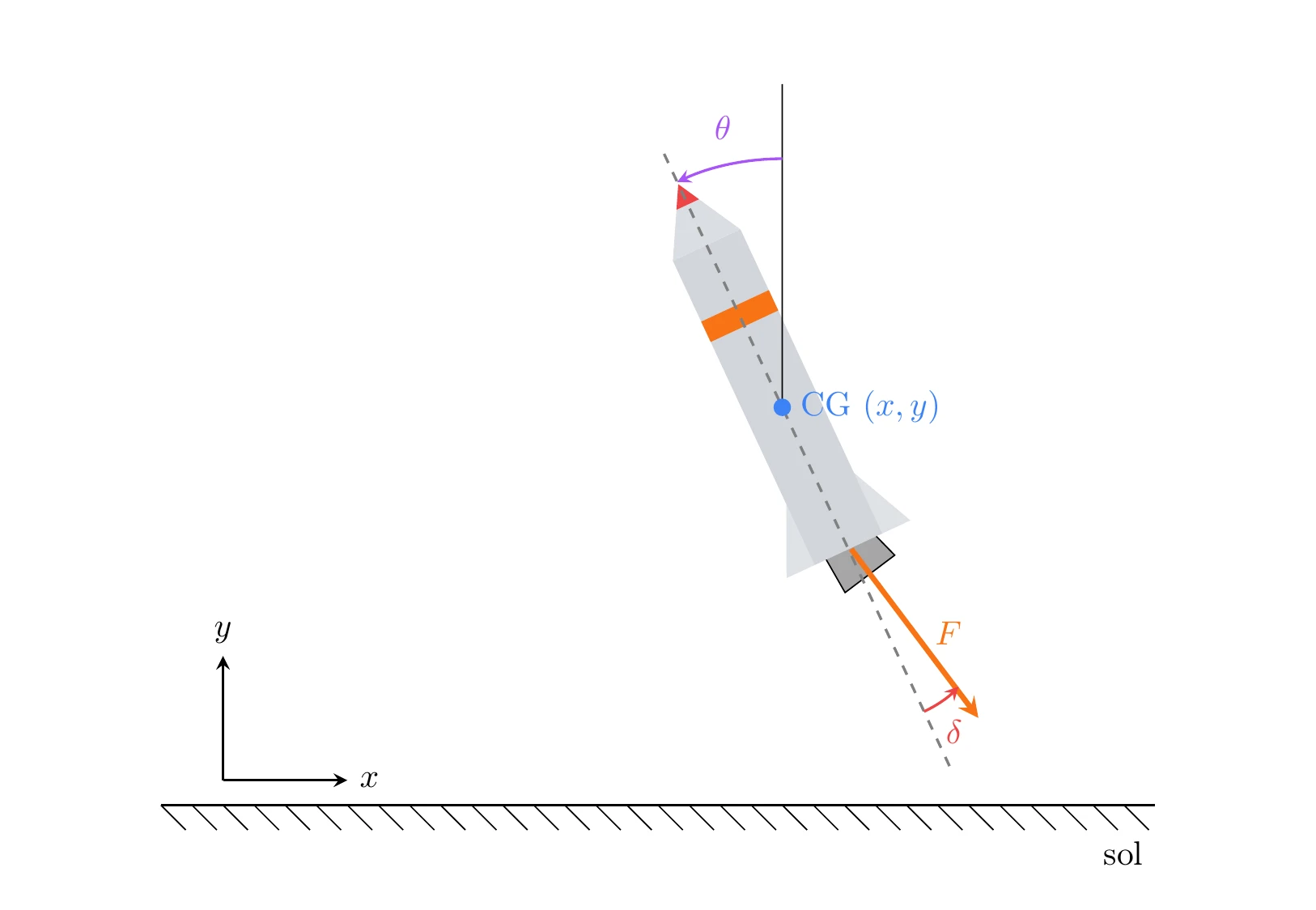
Planar model
Fig. 2. The planar model makes position, pitch, thrust and nozzle deflection explicit before the controller is introduced.FR originalProject excerpt · Figure from my Systems and Simulation assignment statement · Winter 2026
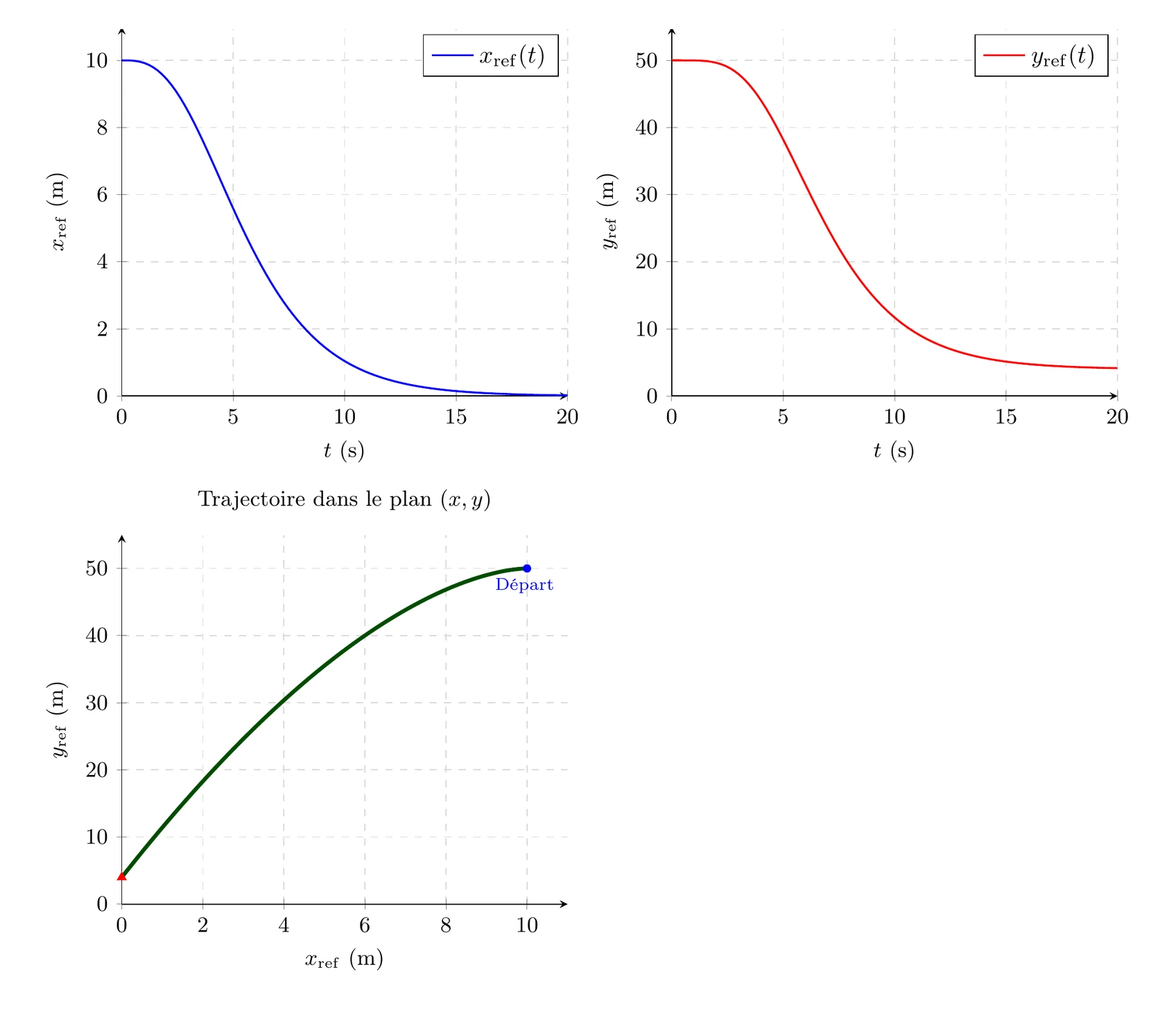
Reference trajectories
Fig. 3. The reference trajectories connect the 20-second time profiles to the planned descent in the (x, y) plane.FR originalProject excerpt · Figure from my Systems and Simulation assignment statement · Winter 2026
6Work and scope
Materials produced
Applied assignment design
Reduced and complete Simulink models
Export script and web visualization of the trajectory
Scope of this presentation
The model equations and exported trajectory were compared and checked.
The presentation concerns the models and exported trajectory, without a study of their effect on learning.
Visible results
One clear path from equations to simulation
A reduced and a complete model that can be compared
A final visual that makes landing criteria concrete
7Next steps
For another systems course, I can develop an applied case, its scientific figures and its simulation interface. Instructors and teaching specialists define the objectives with me and approve the model. We agree on the dependencies, files and technical skills needed to maintain it.